Pet, a case study
Pet is a Tamagotchi for kids: the pet lives on a server, the robot is its body. Kids play with the robot itself and with a picture page on a phone or tablet; parents set the daily routine on a page of their own. Its code: i41-eu/q41eu-pet at v0.14.1 (MIT), online at pet.q41.eu.
What the robot and the phone show
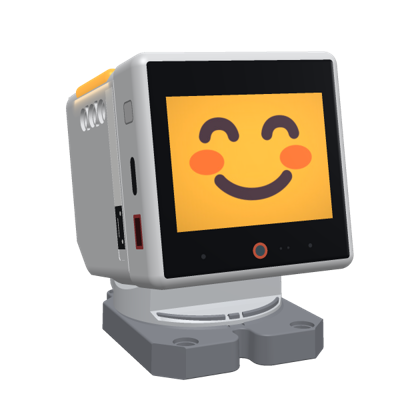
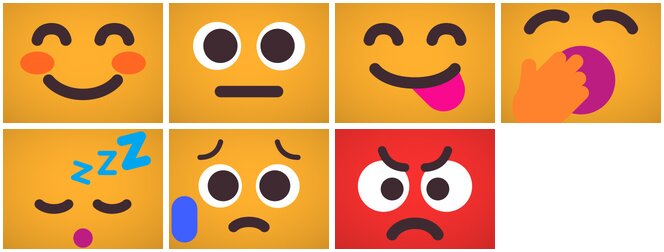
- The face and the LEDs follow the pet's mood, from three needs (food, fun, energy) that drop while it is awake; the LEDs glow dim in the mood's colour, and a hungry pet breathes orange.
- Touch the head: a tickle, a cuddle, a long cuddle or scratching, each with its own line and sound. Hold an NFC food card to it: the food glides into the mouth and goes bite by bite. Shake it: "Wheee!". Come close: it says hello now and then.
- Tap the screen: a menu of picture tiles over the face (food, play, nap, needs) with a back arrow.
- Games: catch the ball (five balls in the screen's quarters; the head circles, wanders, then dodges a hand the light sensor sees coming); the color game (the LED strips show colours, the kid presses them in order on the screen; the three best get a photo from the robot's camera on a podium).
- The day: a lullaby and a warm night light that fades at bedtime, a greeting and a tune in the morning, rest during school hours. It speaks its lines, with a speech bubble.
- The phone: the kid's page works with pictures, no reading needed: the pet's face, three need bars, four big buttons. The parent's page (signed in as the robot's owner, or a PIN at home) has the routine, the food cards, the games and a log. Both are in its readme, with pictures.
How it is built
About 6,900 lines of Go and 930 of pages. Of the kit it uses robothub for the robots' connections, sound for its sounds (the pet's chimes moved into the kit), and leds for its LED colours.
| Part | What it does | Lines |
|---|---|---|
internal/pet | the model: the needs, the daily schedule, moods, the kid's actions. No I/O: the caller passes the time and turns reactions into robot commands. | 847 |
internal/app | the robots through the hub; the engine (robot events to pet actions, moods to the face, speech, LEDs and sounds), the menus, the games, the files on the robot, the head guard, the watchdog; the pages and their API | 4,764 and the pages |
internal/robotpic | pictures for the robot's screen (the needs, menu tiles, game buttons, the podium) and the LED colours | 710 |
internal/voice | the spoken lines: made once and kept | 353 |
cmd/q41eu-pet | the flags, the state (a file or Postgres), the server | 269 |
The tests (2,400 lines): the model with times passed in, and the app end to end (1,300 lines) with a fake robot and a settable clock: pairing, food cards, bedtime and the morning, the games, the sprites, the head after a game.
What it uses of the robot
What the pet sends the robot and handles, and how far Dev's API reaches it today: a program can do the first half of this table, and an app is needed for the rest.
| The robot | For | Through Dev |
|---|---|---|
emotion, face | the robot's own face | face emotion; show clear |
say | the speech bubble | say |
leds: sides, pixels, effects (breathe, blink, rainbow) | moods, the night light, the color game | leds |
nod, shake, look | reactions, the games | move |
speaker sound (binary 0x03), volume | chimes, its voice | sound (the kit's chimes, and volume) |
a picture (binary 0x10) | the needs, the podium, a robot without sprites | show image |
sticker, brightness, screensaver | hearts, the night, the games' fixed brightness | command |
the events screen_tap (with the sprite hit), screen_long_press, head_release, head_swipe_*, nfc_tag, shake, proximity_near | everything the kid does | events: tap (with sprite), long_press, pat, pet, stroke, tag, shaken, near |
readings: imu_a*_g, imu_gyro_dps, head_yaw_deg, head_pitch_deg | held in someone's hands, a sunken head | state (every 2 s) |
sprite, sprite_hide; the event sprite_error | menu tiles, the food, the ball, stars, the drawn faces | an app only: a program cannot store a picture on the robot |
the file store: binary 0x11, assets, asset_delete, play; the events assets, asset_saved, sound_done | its pictures and sounds kept on the robot | an app only |
the event head_press with its three zones | how hard: one finger dreams, the palm wakes it | an app only |
light_stream (binary 0x08, 20 a second) | a hand coming close, in the game | an app only: Dev turns no stream on |
snapshot (binary 0x07) | the podium's photos | an app only |
the events screensaver_on, screensaver_off | the screen's state | an app only |
The key code
The robots, through the kit's hub
As in Focus, plus two callbacks: the robot's readings every two seconds (the head's angles, motion) and its binary streams (the light sensor, a camera photo). The pet wraps the hub's robot in its own type (robotConn) for its rules and its counters.
internal/app/robotconn.go, lines 64–103 at v0.14.1// newHub: robots connect through the hub; the pet's state stays here.
func (a *App) newHub() *robothub.Hub {
return robothub.New(robothub.Config{
Token: a.cfg.RobotToken, Manager: a.cfg.Manager, PublicURL: a.cfg.PublicURL, PairTTL: a.cfg.PairTTL, Log: a.log,
Connected: func(r *robothub.Robot) { a.attach(&robotConn{hubRobot: r, id: r.ID()}, r.Capabilities().Commands) },
Disconnected: func(r *robothub.Robot) {
a.mu.Lock()
c := a.robots[r.ID()]
a.mu.Unlock()
if c != nil && c.conn != nil && c.conn.hubRobot == hubRobot(r) {
a.detach(c.conn)
}
},
Event: func(r *robothub.Robot, ev wire.RobotEventBody) { a.robotEvent(r.ID(), ev) },
Telemetry: func(r *robothub.Robot, m map[string]float64) { a.telemetry(r.ID(), m) },
Binary: func(r *robothub.Robot, kind byte, payload []byte) {
switch kind {
case wire.BinLight: // the game's hand detection
a.lightSamples(r.ID(), payload)
case wire.BinSnapshot: // a leaderboard photo, or a screen snapshot (photos.go)
a.robotSnapshot(r.ID(), payload)
case wire.BinAudioMulti: // a debug recording (debug.go)
a.micAudio(r.ID(), payload)
}
},
// Browsers paired before: the robot starts with its face, not the QR screen.
Paired: func(id string) wire.PairedBody {
a.mu.Lock()
defer a.mu.Unlock()
return a.paired(id)
},
Owner: func(id, owner string) {
a.mu.Lock()
defer a.mu.Unlock()
if rb := a.robots[id]; owner == "" || rb == nil || rb.owner != owner {
a.setOwnerLocked(id, owner)
}
},
})
}The head stays still in a kid's hands
From the motion readings the pet learns the robot's rest pose, and calls it held when it tilts away from it, turns or is shaken (held.go). While held, every head command is dropped, in one place: the robot's connection.
internal/app/robotconn.go, lines 53–59 at v0.14.1// command queues a robot command.
func (c *robotConn) command(name string, args map[string]any) bool {
if headCommands[name] && c.held.Load() {
return false // the head stays still in a kid's hands
}
return c.count(c.Command(name, args))
}Its pictures and sounds, kept on the robot
At connect the pet asks for the robot's file list, keeps what is there with the right checksum (CRC-32), deletes its old files and uploads the rest in chunks, paced behind the commands. Later it shows a picture by its name: a few bytes instead of a JPEG.
internal/app/assets.go, lines 59–90 at v0.14.1 want := petAssets()
for name, b := range want {
if have[name] == crc32.ChecksumIEEE(b) {
r.files[name] = true
}
}
for name := range have { // the pet's old files (e.g. a picture it no longer uses)
if _, ok := want[name]; !ok && strings.HasPrefix(name, assetDir) {
r.conn.command("asset_delete", map[string]any{"name": name})
a.log.Info("deleting an old pet file on the robot", "robot", r.id, "name", name)
}
}
names := make([]string, 0, len(want))
for name, b := range want {
if crc, ok := have[name]; !ok || crc != crc32.ChecksumIEEE(b) {
names = append(names, name)
}
}
sort.Strings(names)
if len(names) == 0 {
a.log.Info("robot files up to date", "robot", r.id, "files", len(want))
a.refreshFace(r)
return
}
r.uploading = map[string]uint32{}
var chunks [][]byte
for _, name := range names {
r.uploading[name] = crc32.ChecksumIEEE(want[name])
chunks = append(chunks, wire.AssetChunks(name, want[name])...)
}
a.log.Info("uploading pet files", "robot", r.id, "files", len(names), "chunks", len(chunks))
go a.sendChunks(r.conn, chunks)A menu from tappable sprites
Each tile is a stored picture shown as a sprite marked tap; the robot's tap event names the sprite it hit, so the pet needs no hit test. The menu closes by itself after 15 s.
internal/app/menu.go, lines 91–103 at v0.14.1 for _, m := range menus[name] {
a.sprite(r, map[string]any{"id": "m:" + m.action, "asset": assetDir + m.asset, "x": m.x, "y": m.y, "z": 21, "tap": true})
}
id := r.menuID
time.AfterFunc(menuTimeout, func() {
a.mu.Lock()
defer a.mu.Unlock()
if r.menu != "" && r.menuID == id && r.conn != nil {
a.closeMenu(r)
a.express(r, a.now())
}
})
}internal/app/engine.go, lines 427–432 at v0.14.1 case "screen_tap":
if r.menu != "" {
sprite, _ := ev.Data["sprite"].(string)
a.menuTap(r, sprite, now)
return
}Timed steps that a newer reaction cancels
Reactions are short scenes: steps at times. Each reaction bumps a counter; a step whose counter is old is dropped, so a quick second touch never mixes two scenes.
internal/app/engine.go, lines 97–114 at v0.14.1// later runs fn after d unless another reaction started meanwhile (or the robot left).
func (a *App) later(r *robot, d time.Duration, fn func()) {
gen := r.gen
time.AfterFunc(d, func() {
a.mu.Lock()
defer a.mu.Unlock()
if r.gen == gen && r.conn != nil {
fn()
}
})
}
// begin starts a reaction: the mood waits until it is over.
func (a *App) begin(r *robot, now time.Time, d time.Duration) {
r.gen++
r.busyUntil = now.Add(d)
a.later(r, d, func() { a.express(r, a.now()) })
}A scene: the food glides into the mouth
A sprite drops in from above the screen, glides down in 700 ms (the robot animates it), and shrinks bite by bite with a munch and a nod.
internal/app/engine.go, lines 760–778 at v0.14.1// eatSprite: the food drops in from the top and glides to the mouth over the face,
// then shrinks bite by bite (munch, nod) and the pet says what it ate.
func (a *App) eatSprite(r *robot, asset, line string) {
c := r.conn
a.emotion(r, "happy")
a.drawnFace(r, "yum")
a.sprite(r, map[string]any{"id": "food", "asset": asset, "x": 160, "y": -60, "scale": 0.8, "z": 1})
a.sprite(r, map[string]any{"id": "food", "x": 160, "y": 170, "ms": 700})
a.later(r, 750*time.Millisecond, func() {
a.play(r, "munch", false)
c.command("nod", nil)
a.sprite(r, map[string]any{"id": "food", "scale": 0.55})
})
a.later(r, 1150*time.Millisecond, func() { a.sprite(r, map[string]any{"id": "food", "scale": 0.3}) })
a.later(r, 1500*time.Millisecond, func() {
c.command("sprite_hide", map[string]any{"id": "food"})
a.sayText(r, line, 3)
})
}A hand seen by the light sensor
During catch the ball the robot streams its light and proximity sensor 20 times a second. A hand coming close raises the proximity or darkens the light; the baselines follow the room. The stream is on only during a game.
internal/app/game.go, lines 259–284 at v0.14.1// handNear reads one light sample: true when a hand seems close. The baselines
// follow the room: proximity drops at once and rises slowly, light follows
// while no hand is near.
func (g *game) handNear(ps, ch0 float64) bool {
g.sawLight = true
g.samples++
if g.samples == 1 {
g.psMin, g.psMax, g.ch0Min, g.ch0Max = ps, ps, ch0, ch0
}
g.psMin, g.psMax = min(g.psMin, ps), max(g.psMax, ps)
g.ch0Min, g.ch0Max = min(g.ch0Min, ch0), max(g.ch0Max, ch0)
if g.psBase < 0 {
g.psBase, g.ch0Base = ps, ch0
return false
}
near := ps >= g.psBase+proxRise || (g.ch0Base >= shadowMin && ch0 < g.ch0Base*shadowPart)
if ps < g.psBase {
g.psBase = ps
} else if !near {
g.psBase += (ps - g.psBase) * 0.02
}
if !near {
g.ch0Base += (ch0 - g.ch0Base) * 0.05
}
return near
}And without sprites
A robot without the ball's picture, or an older firmware, gets the same game as whole pictures.
internal/app/game.go, lines 168–178 at v0.14.1 if ball := assetDir + "ball.png"; r.canSprite(ball) {
// The ball glides over the face to its next spot (the center of a quarter).
x, y := 80+160*(spot%2), 60+120*(spot/2)
if g.round == 1 {
a.sprite(r, map[string]any{"id": "ball", "asset": ball, "x": x, "y": y, "scale": 0.6, "z": 1})
} else {
a.sprite(r, map[string]any{"id": "ball", "x": x, "y": y, "ms": 300})
}
} else {
a.showPicture(r, robotpic.Ball(spot))
}What it teaches
- Make meaning from raw input. The robot reports presses with their zones, releases with their length, swipes and tags; the pet decides what was a tickle, a cuddle or scratching, and waits half a second so a food card wins over the hand that brought it. Dev's
gesturepackage does the general part (a pat, a pet, a stroke) for every program. - Guard the body. A robot in a kid's hands must not twist its head: one check where commands leave the app covers every reaction and game.
- Keep pictures on the robot. Upload once, by checksum; show by name. Sprites move, fade and scale on the robot itself, and a tappable sprite is a button.
- Give timed steps a generation. A counter cancels the rest of a scene when a newer one starts; no timers to track down.
- Turn streams on only while needed. The light stream runs during a game; at connect the pet turns it off, in case a game was cut short.
- Fall back. Without sprites, whole pictures; without the light stream, the head dodges on a timer; without a stored sound, the sound itself.
- Repair what got lost. A command can be dropped (a full queue) or undone (the robot blanks its screen after a minute without commands); a watchdog notices and shows the pet's face again.
- A pure model, an app test with a fake robot. The needs and the schedule are tested with times passed in; the app test drives a fake robot and a settable clock through the games, bedtime and the morning.