Focus, a case study
Focus is a focus timer for the robot, in the style of the Pomodoro Technique®: focus for 25 minutes, a 5 minute break, and a longer break after every four. The robot is the timer; a phone is optional. Its code: i41-eu/q41eu-focus at v0.5.0 (Apache-2.0), online at focus.q41.eu. The Pomodoro Technique® is a registered trademark of Francesco Cirillo; Focus is not affiliated with it.
What the robot and the phone show
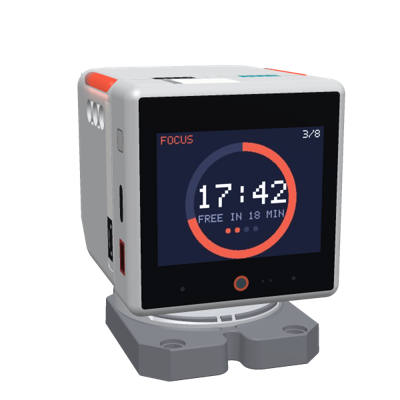
- The screen: the phase (FOCUS, SHORT BREAK, LONG BREAK), the time left as a ring, today's count with the daily goal, the set's dots, and a line for the room: FOCUSING, STRETCH, TAKE A WALK, PAUSED, TAP TO FOCUS.
- The LEDs: both strips show the time left in the same six steps, dim: red while focusing, green or blue on a break, amber when paused, off when idle. A sign for others in the room.
- Touch: tap the screen, or touch the head, to start or pause; hold the screen to skip to the next phase.
- The end of a phase: a rising bell and a nod after focus; two calm notes and a look up after a break.
- The phone or computer (paired by the robot's QR code, or signed in through the manager; optional): the same timer with Start/Pause, Skip and Reset, what you focus on, marks for interruptions, today's focus periods, days in a row, the last seven days, and the settings.
How it is built
About 2,200 lines of Go and a 390-line page, in four parts; of the kit it uses robothub for the robots' connections and sound for its three chimes.
| Part | What it does | Lines |
|---|---|---|
internal/timer | the timer's rules: phases, start, pause, skip, reset, the history and the statistics. Pure: the caller passes the time. | 384 |
internal/screen | the robot's picture (the ring, and a 5×7 pixel font of its own) and the LEDs' colours | 381 |
internal/app | the robots through the kit's hub, the page's API and its event stream, pairing, sign-in through the manager, the browsers reported to it | 1,214 |
cmd/q41eu-focus | the flags, the state (a file or Postgres), the server | 210 |
The tests (730 lines): the timer's rules with times passed in, the pictures, and the app end to end, a fake robot over a real connection and a test clock.
What it uses of the robot
Every message Focus sends the robot or handles, and the same through Dev's API: a program can do what Focus shows on the robot with these actions.
| The robot | For | Through Dev |
|---|---|---|
a picture (binary 0x10, a 320×240 JPEG) | the timer | show image |
leds with 12 pixels | the time left | leds pixels (or bar) |
speaker sound (binary 0x03): the chimes start, done, break_over | a start, the end of a phase | sound chime |
nod; look at yaw 0, pitch 30 | the end of a phase | move gesture nod; yaw, pitch |
the events screen_tap and head_press | start or pause | events: tap; for the head pat or pet, when the touch ends |
the event screen_long_press | skip | long_press |
The key code
The robots, through the kit's hub
The hub checks the robots' tokens (the shared one, or one a manager gave the robot), keeps one connection per robot, makes the pairing codes for its QR screen and reports the paired browsers to the manager. Focus only says what to do when a robot connects, leaves or reports something; the timer is its own.
internal/app/robot.go, lines 18–38 at v0.5.0// newHub: robots connect through the dev kit's hub (github.com/i41-eu/q41eu-dev/robothub), which
// checks their tokens, keeps their connections and pairing codes; the timer is the app's.
func (a *App) newHub() *robothub.Hub {
return robothub.New(robothub.Config{
Token: a.cfg.RobotToken, Manager: a.cfg.Manager, PublicURL: a.cfg.PublicURL, PairTTL: a.cfg.PairTTL, Log: a.log,
Connected: a.attach,
Disconnected: a.detach,
Event: func(c *robothub.Robot, ev wire.RobotEventBody) { a.robotEvent(c.ID(), ev) },
// The timer needs no browser: the robot always hears of one, so it shows the timer, not its QR screen.
Paired: func(id string) wire.PairedBody {
a.mu.Lock()
defer a.mu.Unlock()
return a.paired(id)
},
Owner: func(id, owner string) {
a.mu.Lock()
defer a.mu.Unlock()
a.setOwnerLocked(id, owner)
},
})
}No browser needed
A robot whose app has no paired browser shows its QR screen. The timer needs no browser, so the robot always hears of at least one, and shows the timer at once (the QR code stays a swipe away).
internal/app/app.go, lines 148–164 at v0.5.0// paired is what the robot hears about browsers. The timer needs none, so the robot always
// hears at least one: it shows the timer, not its QR screen (the QR stays a swipe away).
// a.mu held.
func (a *App) paired(robotID string) wire.PairedBody {
viewers, seen := 0, map[string]bool{}
for _, s := range a.sessions {
if slices.Contains(s.Robots, robotID) {
viewers++
}
}
for sub := range a.subs {
if s := a.sessions[sub.sid]; s != nil && slices.Contains(s.Robots, robotID) {
seen[sub.sid] = true
}
}
return wire.PairedBody{Viewers: max(1, viewers), Watching: len(seen), Reconnect: true}
}Touches: one action each
The robot reports raw input: a touch on the screen, a press on the head. Focus starts or pauses on either, at most once in 1.5 s (touchGap), so one touch is one action however it is reported; a long press skips.
internal/app/robot.go, lines 61–83 at v0.5.0// robotEvent: a tap on the screen or a touch on the head starts or pauses; a long press on the
// screen skips to the next phase.
func (a *App) robotEvent(id string, ev wire.RobotEventBody) {
a.mu.Lock()
defer a.mu.Unlock()
r := a.robots[id]
if r == nil {
return
}
now := a.cfg.Now()
r.lastSeen = now
switch ev.Name {
case "screen_tap", "head_press":
if now.Sub(r.lastTouch) < touchGap {
return
}
r.lastTouch = now
a.actLocked(r, "toggle", "", now)
case "screen_long_press":
r.lastTouch = now
a.actLocked(r, "skip", "", now)
}
}Send only what changed
The robot's picture is Focus's own drawing, sent as a JPEG. A key names each picture, and a new one goes to the robot only when the key changes: six times a phase when calm, every second only when the seconds are shown. The LEDs likewise.
internal/app/robot.go, lines 159–183 at v0.5.0// showLocked sends the robot its picture and LEDs when they changed: a picture every second
// only with the seconds shown, once a minute with minutes, six times a phase when calm. a.mu held.
func (a *App) showLocked(r *robot, now time.Time) {
c := r.conn
if c == nil {
return
}
v := a.screenView(r, now)
if key := screen.Key(v); key != r.shownFrame {
r.shownFrame = key
c.Binary(wire.BinShowJPEG, screen.Frame(v))
}
if !r.timer.Settings.Lights {
v.Status = "idle" // all off
}
leds := strings.Join(screen.LEDs(v), ",")
if leds != r.shownLEDs && slices.Contains(r.commands, "leds") {
r.shownLEDs = leds
px := []any{}
for _, c := range screen.LEDs(v) {
px = append(px, c)
}
c.Command("leds", map[string]any{"pixels": px})
}
}The end of a phase
The chimes are the kit's (sound.Chime), each short enough for one speaker message (the robot buffers about 3 s); the head nods or looks up, unless the person turned the moves off.
internal/app/robot.go, lines 124–149 at v0.5.0// reactLocked is the robot's answer to what happened: a sound, a nod, a look up. a.mu held.
func (a *App) reactLocked(r *robot, ev timer.Event) {
c, s := r.conn, r.timer.Settings
if c == nil {
return
}
play := func(name string) {
if s.Sound && slices.Contains(r.commands, "speaker") {
c.Binary(wire.BinSpeakerPCM, sound.Message(sound.Chime(name)))
}
}
switch ev {
case timer.Started, timer.Resumed:
play("start")
case timer.Completed: // a break now: a bell and a nod
play("done")
if s.Moves {
c.Command("nod", nil)
}
case timer.BreakOver: // back to work: two notes, a look up at the person
play("break_over")
if s.Moves {
c.Command("look", map[string]any{"yaw": 0, "pitch": 30})
}
}
}The rules, pure
The timer never reads a clock: the app's loop calls Tick with the time every 200 ms, and the tests call it with any time they like, so a whole set of focus periods and breaks runs in milliseconds.
internal/timer/timer.go, lines 227–243 at v0.5.0// Tick moves the timer on when a running phase is over. It returns what happened (one event at
// most; call it again for the next).
func (t *Timer) Tick(now time.Time) Event {
if t.Status != Running || now.Before(t.EndsAt) {
return ""
}
end := t.EndsAt
if t.Phase == Focus {
t.History = append(t.History, Done{At: end.UTC(), Minutes: t.Settings.FocusMin, Task: t.Task})
t.prune(now)
t.Round++
t.next(end, true)
return Completed
}
t.next(end, true)
return BreakOver
}What it teaches
- Let the kit hold the robots. Tokens, connections, pairing codes and the manager's reports are twenty lines of configuration (
newHub); the app keeps its own state. - Keep the rules pure. A model that takes the time from its caller is easy to test, and the robot, the page and the statistics all read the same timer.
- The screen is a picture you draw. Any Go image becomes the robot's screen; the kit's
screendraws cards and questions the same way (Dev'sshow). - Send what changed, not every tick. A key per picture and the last LEDs keep the robot's connection quiet and its screen calm.
- Work without a phone. Telling the robot it has a viewer puts the app on its screen from the start; the phone adds settings and statistics.
- One action per touch. A short gap turns a touch that is reported twice into one start or pause.
- Test end to end. A fake robot on a real connection and a test clock run the app as the robot would (
app_test.go).
Also in the kit for an app like it: leds.Bar and leds.Dim make a bar like Focus's own LEDs, robot.Play paces a sound of any length for the speaker, and robot.Gesture and robot.Look check that the robot offers the command first.